
 connect cfx.re/join/oqjrvj
 Join our Discord
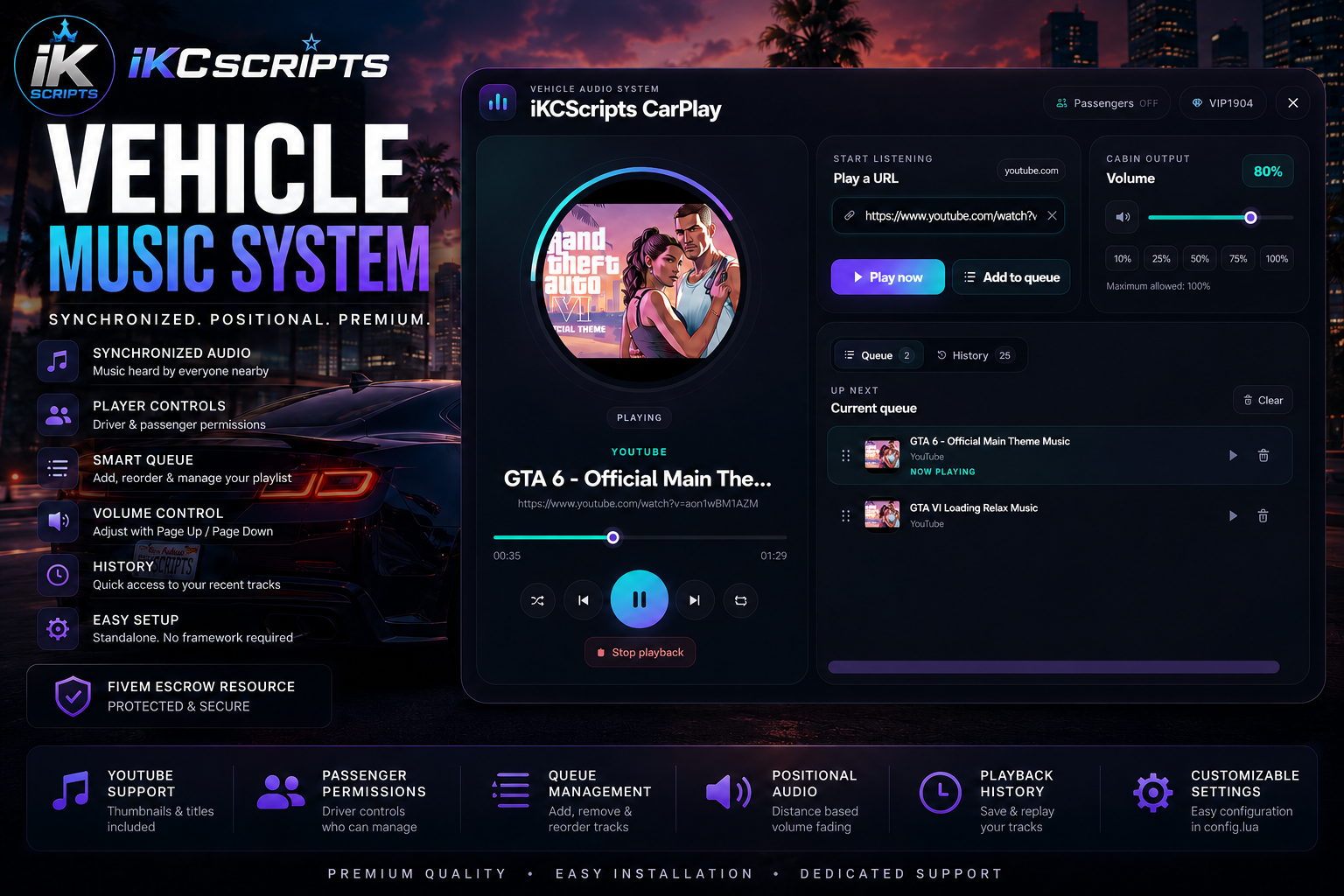
🎵 iKCScripts Vehicle Music System
Bring synchronized, positional vehicle music to your FiveM server with a clean, modern interface and an easy-to-use playback system.
The iKCScripts Vehicle Music System allows drivers to play supported music URLs directly from their vehicle, build and reorder queues, manage playback history, control passenger access, and adjust volume, all while nearby players hear the music naturally fade based on their distance from the vehicle.
Designed to be simple for players and easy for server owners to install, with no framework or SQL dependency required.
✨ Main Features
-
Premium in-game vehicle music interface
-
Synchronized positional audio for nearby players
-
Natural distance-based volume fading
-
Audio follows the vehicle while it moves
-
Stable playback for occupants at higher vehicle speeds
-
Play Now and Add to Queue options
-
Drag-and-drop queue reordering
-
Play, pause, stop, seek, loop, and shuffle controls
-
Persistent player URL history
-
History search and sorting options
-
Driver-controlled passenger permissions
-
Passenger playback controls when authorized
-
Page Up and Page Down volume keybinds
-
Driver-linked volume control after leaving the vehicle
-
Clean, non-stacking volume notifications
-
Automatic cleanup when a vehicle is destroyed or deleted
-
Configurable command, keybind, distance, volume, and other settings
-
Standalone resource
-
No QBCore, Qbox, or ESX required
-
No SQL installation required
🎮 How Players Use It
- Enter a networked vehicle as the driver.
- Press
Jor enter/carplay. - Paste a supported URL into the video URL field using
Ctrl + V. - Select Play Now or Add to Queue.
- Use the playback controls to manage the active song.
- Drag the queue handle to move songs above or below other tracks.
- Use Page Up and Page Down to adjust the volume.
- Enable passenger controls when other vehicle occupants should have access.
The default command and keybind can be changed by the server owner.
🔊 Positional Audio
Music is synchronized to the vehicle and heard by nearby players.
As players move farther away, the volume naturally fades. When they approach the vehicle again, the audio becomes louder based on their distance.
The system also automatically cleans up active audio when the associated vehicle is destroyed, deleted, or no longer exists.
📋 Queue and History
Players can build a complete playlist without interrupting the currently playing song.
Queue features include:
-
Add multiple songs
-
Play a queued track immediately
-
Remove individual tracks
-
Reorder tracks using the drag handle
-
Loop and shuffle playback
-
Maintain the current-track position after reordering
Previously used URLs are stored in each player’s history, allowing them to quickly replay tracks or add them back to the queue.
👥 Passenger Permissions
The driver remains the owner of the active vehicle music session.
Drivers can choose whether passengers are allowed to control playback using the Passengers ON/OFF option. This permission applies only to the current session and helps prevent unauthorized passengers from changing the music.
🔗 Supported URLs
The system supports:
-
Direct audio URLs compatible with xSound
-
Other compatible media URLs supported by the installed xSound version
Spotify page links are not playable because Spotify does not provide a direct public audio stream through normal song or playlist URLs.
⚙️ Requirements
Before purchasing, make sure your server has:
-
A FiveM server with OneSync enabled
-
A current installation of xSound
-
A valid Cfx.re server license
Required start order:
ensure xsound
ensure kc_carplay
The resource is standalone and does not require a roleplay framework.
🛠️ Configuration
The included config.lua remains editable and contains clearly labeled settings for options such as:
-
Interface command
-
Default keybind
-
Playback distance
-
Default volume
-
Volume adjustment amount
-
Driver access distance
-
Notification behavior
-
Other system settings
🔐 Cfx.re Asset Escrow
This package is delivered through the official Cfx.re Asset Escrow system.
Protected resource files require a valid entitlement connected to the purchasing Cfx.re account. The configuration file remains accessible so server owners can customize the resource.
After purchasing, download the asset from the Cfx.re account connected to your Tebex purchase.
📘 Documentation
Complete installation, configuration, usage, supported URL, and troubleshooting information is available here:
CLICK HERE -> DOCUMENTATION
Please review the documentation before requesting support, as many common setup questions are already covered.
💬 Customer Support
Need additional assistance? Join the official iKCScripts Discord:
CLICK HERE -> SUPPORT
Verified customers receive access to the private iKCScripts help channels for installation questions, troubleshooting, bug reports, and product updates.
When requesting support, please include your resource version, console errors, screenshots, and the steps required to reproduce the issue.
⚠️ Important Information
-
This is a digital FiveM resource.
-
No physical product will be delivered.
-
xSound is a separate dependency and is not included.
-
OneSync must be enabled.
-
Spotify song and playlist page URLs are not supported.
-
Support does not include repairing extensive customer modifications.
-
Compatibility with heavily modified third-party audio resources is not guaranteed.
-
Purchases are governed by the applicable Tebex and Cfx.re digital-product terms.
📜 License
Purchase grants permission to use the resource according to the included commercial license.
Redistribution, sharing, leaking, reselling, sublicensing, or uploading the resource to public or private download services is prohibited.
The resource may not be included in script packs, shared server packages, public repositories, leak websites, or products sold by another creator.
Upgrade your server’s vehicle experience with synchronized music, positional audio, player queues, persistent history, and a polished interface - all in one standalone system.